SIMATIC ET 200SP Module Identification Guide
How to read an ET 200SP order number, tell the DI, DQ, AI and IM module families apart, map SIPLUS 6AG1 to standard 6ES7, and prepare an accurate module inquiry.
What the ET 200SP System Is
SIMATIC ET 200SP is a scalable distributed I/O system that sits on a DIN rail and connects a machine's field signals back to a controller over PROFINET or PROFIBUS. A station is assembled from three building blocks: an interface module (IM) at the head, a row of I/O modules plugged onto BaseUnits, and a server module that closes the station. Because each I/O module handles one signal group, teams almost never move a whole station — they identify and source the single module that needs attention.
That makes correct identification the first and most important step. A station rarely fails as a unit; a specific channel type, potential group, or firmware level is what you actually need to match. This guide walks through the order-number logic so your module request maps to exactly one part.
Reading an ET 200SP Order Number
Every ET 200SP module carries a Siemens order number (also called an MLFB) printed on the module and readable in the engineering project. The standard family begins with 6ES7, and the ruggedized SIPLUS family begins with 6AG1. The first three digits after the prefix identify the module class:
- 131 — Digital input (DI) modules
- 132 — Digital output (DQ) modules
- 134 — Analog input (AI) modules
- 135 — Analog output (AQ) modules
- 155 — Interface modules (IM) that head the station
- 193 — BaseUnits and the server module
The middle segment encodes channel count, signal level, and diagnostic feature level (for example a "standard" ST module versus a "high feature" HF module). The final segment is the functional version. Record the full string end to end — a single changed character usually means a different channel type or diagnostic capability.
For the input side of a station, the io-modules category groups the DI, DQ, AI and AQ records you will most often identify; the head-end and network side sit under communication-networking.
The Module Families You Will Meet
A typical ET 200SP station combines several module classes on the rail:
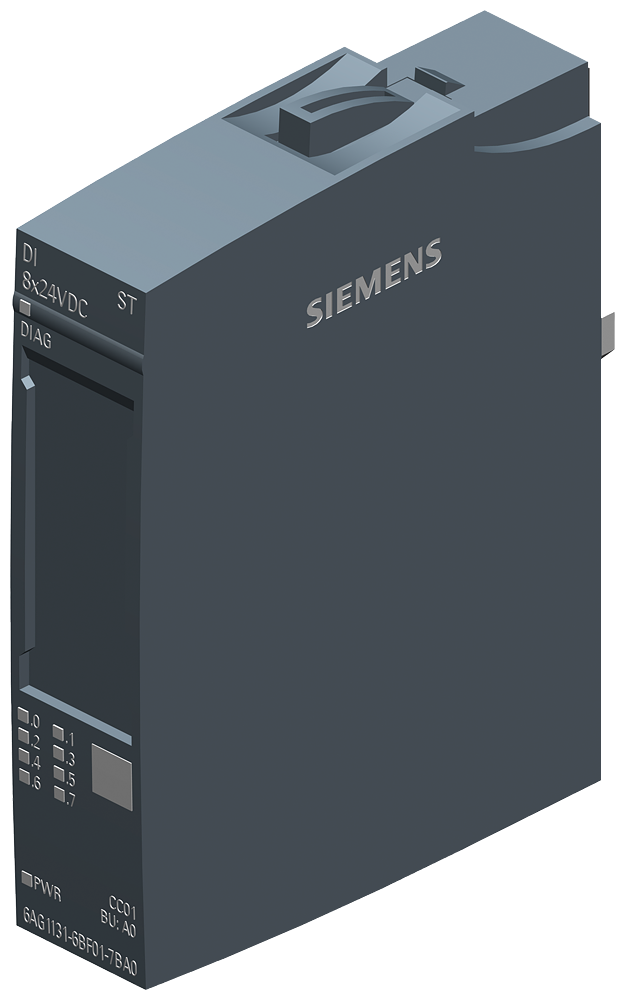
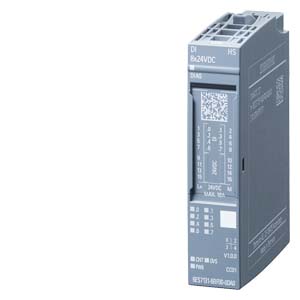
- Digital input modules (131) read field contacts and sensors. Records in this class include 6AG1131-6BF00-7CA0, 6AG1131-6BF01-7BA0 and 6AG1131-6BH01-7BA0.
- Digital output modules (132) drive actuators, valves and contactors — for example 6AG1132-6BF01-7BA0 and 6AG1132-6HD01-7BB1.
- Analog input modules (134) process measured signals such as current, voltage and temperature, including records like 6AG1134-6FF00-2AA1.
- BaseUnits and the server module (193) carry the modules and route the potential groups; the light or dark BaseUnit choice decides where a new load group starts.
Each class splits further by channel count and by whether the module is a standard or high-feature type, so the class digit alone is never enough — the middle and final segments decide the exact record.
SIPLUS 6AG1 vs Standard 6ES7
One of the most common points of confusion is the relationship between a standard module and its SIPLUS counterpart. SIPLUS modules (6AG1…) are built for extended temperature ranges and harsher conditions such as conformal-coated boards, and each one maps one-to-one to a standard 6ES7… module through a shared base number.
The pattern is straightforward once you see it: 6AG1131-6BF00-7CA0 is the SIPLUS form of the standard 6ES7131-6BF00-0BA0. The class and type segments in the middle stay identical; only the prefix and the trailing conditioning code change. If your station runs in a wide-temperature cabinet or an outdoor enclosure, confirm whether the original build used the SIPLUS variant before you match a module — a like-for-like request by order number keeps the environmental rating intact.
How to Identify the Right Module — Step by Step
To turn "a module failed" into a precise request:
- Read the full order number from the module faceplate, the side label, or the hardware configuration in the engineering project.
- Confirm the class digit (131/132/134/135/155/193) so the signal group is unambiguous.
- Note the BaseUnit and slot position, since the light/dark BaseUnit choice and potential group affect how the module is wired into the station.
- Check the firmware or functional version in the final segment, because some station configurations expect a matching version.
- Record the interface module at the head of the station — the IM sets the fieldbus (PROFINET or PROFIBUS) and the station addressing.
Following the same discipline used in our part-number identification guide removes almost every mismatch before a request is ever sent.
Confirming a Module in the Field
When the engineering project is not at hand, the module itself carries enough to identify it. The order number and functional version are laser-printed on the module housing, and the module type is echoed in the colour-coded reference identifier on the BaseUnit. The diagnostic LEDs show channel and group status, which helps confirm whether the fault sits in the module, the BaseUnit, or the field wiring before a request is raised. Photograph the faceplate label and the station layout so the order numbers and the slot sequence travel with the inquiry — that single habit prevents most back-and-forth during review.
Preparing an ET 200SP Inquiry
Once you have the order number confirmed, a clean inquiry moves quickly. Include the full MLFB, the quantity of modules, the station's interface module, and any wide-temperature or conformal-coating requirement so a SIPLUS record is matched where it is needed. Adding the destination region and the project timeline lets the request be handled with the right context.
When you are ready, use the inquiry form with the exact order numbers, or reach the team through the contact page. For multi-line stations, the same preparation habits in our procurement checklist keep a full bill of modules organized in one request.
Summary
ET 200SP identification comes down to three habits: read the whole order number, use the class digit to fix the signal group, and decide the standard-versus-SIPLUS question before matching a module. Do that, and every module request maps to a single record — which is exactly what makes an inquiry fast to review and accurate to fulfil. Browse the io-modules category to line up the records for your station, then submit the order numbers together.