SIMATIC S7-1200 CPU & Module Identification Guide
How to identify Siemens SIMATIC S7-1200 CPUs and modules by 6ES7 order number, power supply type and I/O layout for an accurate inquiry.
Why Precise S7-1200 Identification Matters
The SIMATIC S7-1200 family covers a wide span of compact controllers, and two units that look nearly identical on a panel can differ in supply voltage, digital and analog I/O count, or communication capability. When you prepare a like-for-like sourcing request, a single wrong digit in the order number leads to a module that does not match your control cabinet. Reading the physical device correctly — and understanding what each field on the printed label documents — is the fastest way to prepare an accurate inquiry and avoid a mismatched shipment.
This guide walks through how to read a SIMATIC S7-1200 CPU, how the 6ES7 order number is structured, and how to tell a signal board, signal module, and communication module apart. It complements our broader part-number identification guide and the distributed-I/O focused ET 200SP module identification guide.
Reading the CPU Model First
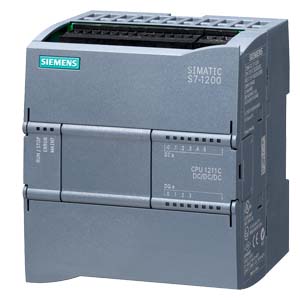
Every S7-1200 controller carries a short model designation printed on the front, such as CPU 1211C, CPU 1212C, or CPU 1214C. The three-digit number after "CPU" indicates the position in the family and, in practical terms, the on-board I/O density:
- CPU 1211C — the smallest, with the fewest on-board digital points and a single signal board slot.
- CPU 1212C — a middle tier with more on-board I/O and support for a limited number of signal modules.
- CPU 1214C — a larger frame with higher on-board I/O count and broader module expansion.
- CPU 1215C / 1217C — higher-tier frames adding features such as dual Ethernet ports or high-speed differential I/O.
The trailing C marks the compact form with integrated I/O. Note the model, but treat it as only the first clue — the model alone does not tell you the supply and I/O variant, which is exactly where sourcing mistakes happen.
Decoding the 6ES7 Order Number
The full identity of any S7-1200 part is its order number, which begins with the 6ES7 prefix. This prefix documents the product category — it tells you the item belongs to the Siemens SIMATIC industrial controller line. The characters that follow narrow the item down to a specific frame, supply type, and I/O configuration.
A practical way to read it:
- Confirm the 6ES7 prefix to establish the SIMATIC product family.
- Read the next digits, which group the item by controller frame (for example, the 211 group aligns with the CPU 1211C, and 212 with the CPU 1212C).
- Read the middle field, which distinguishes the supply and I/O signal type (for instance a DC/DC/DC unit versus an AC/DC/relay unit).
- Read the trailing block, which captures the hardware functional version.
Resist the urge to invent a precise meaning for every single character. The reliable rule is that the prefix identifies the category and the complete order number identifies the exact part — and the only trustworthy source for that complete number is the label on the device itself or your engineering project file. Confirm all fourteen characters before you send anything to a supplier.
Supply Type: DC/DC/DC vs AC/DC/Relay
One field in the middle of the order number encodes the power and output arrangement, and it is the field most often misread. The common S7-1200 supply variants are described as:
- DC/DC/DC — a 24 V DC supply, 24 V DC inputs, and transistor (DC) outputs, suited to fast switching of DC loads.
- AC/DC/relay — a 120/230 V AC supply, 24 V DC inputs, and relay outputs, suited to switching mixed AC or DC loads through dry contacts.
For a CPU 1211C, these two arrangements map to distinct order numbers. The 6ES7211-1AE40-0XB0 and the 6ES7211-1BE40-0XB0 are model-specific variants within the same 1211C frame, and the 6ES7211-1HE40-0XB0 is a further variant in that group. Stepping up a frame, the 6ES7212-1AE40-0XB0 sits in the CPU 1212C group. Because the frame and the supply field both live inside the order number, reading them together is what pins down the correct unit. Browse the full PLC CPUs & controllers category to see how these variants are organized side by side.
Telling Signal Boards, Signal Modules, and Communication Modules Apart
Beyond the CPU itself, the S7-1200 expands through three different accessory classes, and each mounts differently:
- Signal Board (SB) — a small board that clips into the front recess of the CPU, adding a few extra I/O points without widening the assembly footprint.
- Signal Module (SM) — a full module that attaches to the right side of the CPU, adding larger blocks of digital or analog I/O.
- Communication Module (CM) — a module that attaches to the left side of the CPU, adding serial, PROFIBUS, or other network interfaces.
Physically confirming which side a module sits on — front recess, right, or left — is a quick way to classify an unlabeled spare before you read its order number.
A Step-by-Step Field Identification Routine
When you have a physical unit in front of you, work through it in order:
- Read the model designation on the front face (CPU 1211C, 1212C, 1214C, and so on).
- Locate the full order number and confirm it begins with 6ES7.
- Record the frame group digits and match them against the model you just read.
- Read the supply field and decide whether the unit is DC/DC/DC or AC/DC/relay.
- Note the firmware and hardware functional version printed near the number.
- Photograph the complete label so nothing is transcribed from memory.
- For any attached accessory, classify it as SB, SM, or CM by its mounting position, then read its own 6ES7 number.
Preparing an Accurate Inquiry
Once every field is confirmed, assemble the details into a single request so the response you receive matches exactly what your cabinet needs. A clean inquiry lists the complete order number, the model designation, the supply variant, the quantity, and any relevant hardware version. For a structured way to gather these details before you send anything, follow our procurement checklist, which is built around the same field-by-field discipline described here.
If a label is worn, damaged, or partly unreadable, do not guess the missing characters. Send us clear photographs of what you can read through the contact page or start directly from the inquiry form, and our technical team will help confirm the model-specific order number from the documented SIMATIC catalog before you commit to a part.